A centered circular logo covering up to 14 percent of a short code's area always still readable, at the strongest error correction. A square did worse than a circle, the weakest error correction failed at 2 percent, and a longer web addressesses survived more logo, not less.
Most advice on QR code logo size gives a number with no method behind it. We ran the test: 408 combinations, 60 codes each, and one result that contradicts the usual guidance.
We covered QR codes with a logo 15,840 times and read them back with a decoder: 11 coverage levels, 4 error correction levels, 2 logo shapes, 3 lengths of web addres, and 60 different codes in every combination. Every guide to this gives a number. Almost none of them say how they got it.
What QR code logo size is actually safe?#
The largest coverage where all 60 codes in a cell still read, by error correction level:
| What the code holds | Logo shape | L | M | Q | H |
|---|---|---|---|---|---|
| Short link, 30 characters | Square | 0% | 4% | 6% | 10% |
| Short link, 30 characters | Circle | 2% | 4% | 8% | 14% |
| Plain address, 52 characters | Square | 2% | 2% | 8% | 12% |
| Plain address, 52 characters | Circle | 2% | 6% | 10% | 20% |
| Campaign address, 99 characters | Square | 2% | 8% | 12% | 18% |
| Campaign address, 99 characters | Circle | 4% | 8% | 14% | 20% |
Coverage is area, not width. A square covering 10 percent of the area is about a third of the code's width, which looks bigger than the number sounds.
Why did the longer address survive more logos??#
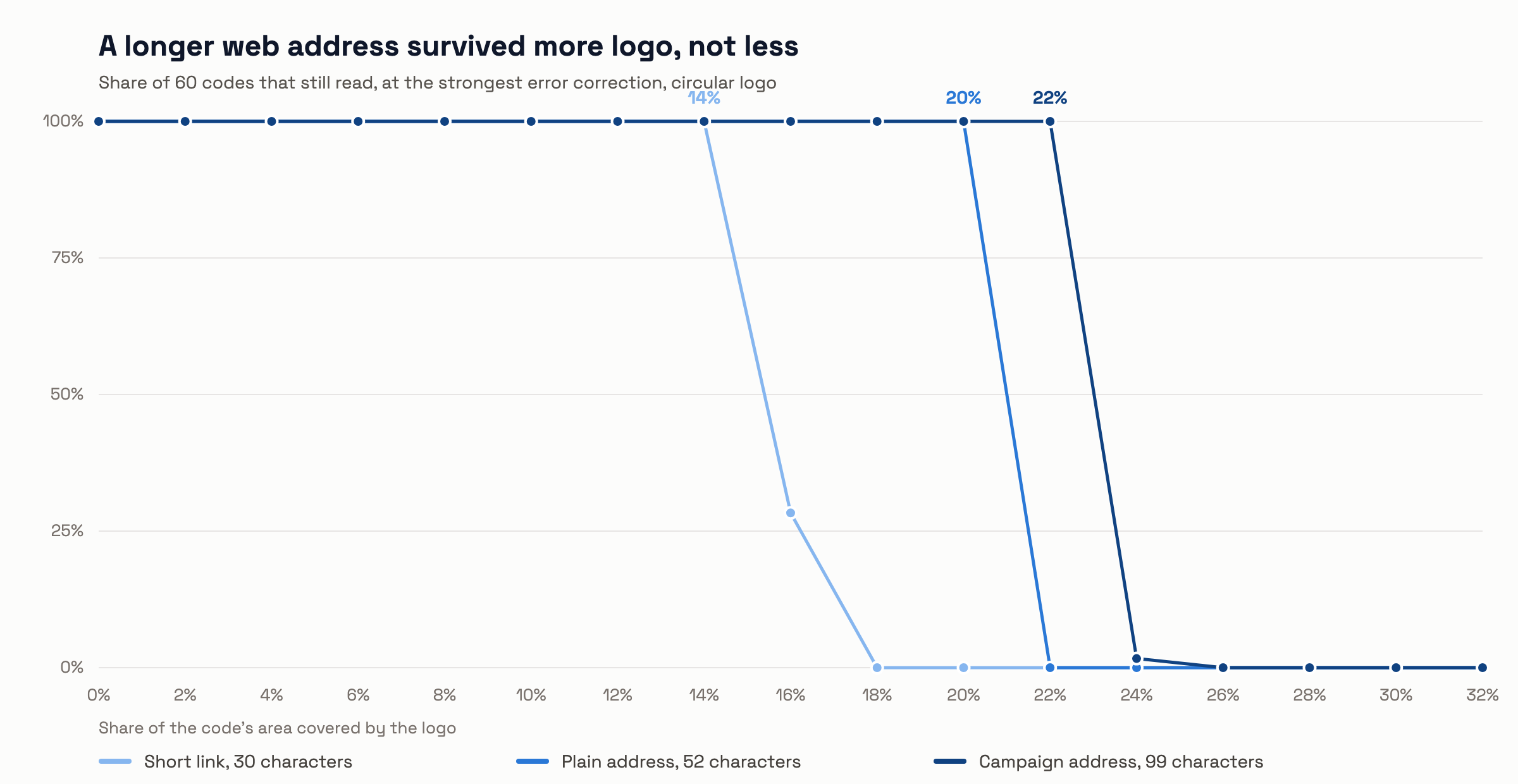
Because error correction repairs a code in blocks, and a denser pattern spreads the damage across more of them instead of destroying a few outright.
A short link makes a small, sparse pattern. A centered patch wipes out most of a handful of blocks, and a block that is mostly gone cannot be rebuilt. The same patch on a dense pattern clips the edges of many blocks, and a block that is mostly intact is repaired. More data means more blocks, and more blocks means the damage is shared.
This is not permission to print long addresses. A dense pattern has smaller squares, so it has to be printed larger or scanned from closer to be readable at all. Our test reads clean images on a screen. It never asked a phone camera to resolve a tiny pattern across a room, and that is the trade a longer address makes.
Does the logo shape matter?#
Yes, and more than we expected. At the same area, a circle beat a square in every single combination we tested.
At the strongest error correction on a short link, a square was safe to 10 percent and a circle to 14 percent. On a plain address the gap was 12 percent against 20. A square reaches further into the corners, and corners are where the patterns that tell a scanner how to read the grid tend to live.
Which error correction level should you use?#
Use the highest, H, for anything with a logo. The lowest, L, failed with almost any logo at all.
The four levels repair roughly 7, 15, 25 and 30 percent of a damaged code. In our runs L gave out between 0 and 4 percent coverage, M between 2 and 8, Q between 6 and 14, and H between 10 and 22. Moving from Q to H roughly doubled what survived. If your generator lets you choose, choose H, and accept the slightly busier pattern.
Why is there no single safe percentage?#
Because where the logo lands matters as much as how much it covers, and the honest answer is a range rather than a number.
Three of our combinations read better with more logo than with less. One code at 8 percent coverage read 13 percent of the time, and the same setting at 10 percent read 32 percent of the time. That is not noise in the tooling. A patch that happens to sit over a timing pattern costs far more than a patch of the same size sitting over ordinary data, and shifting it slightly changes which it hits. Any article that hands you one confident number is rounding away that effect.
What this test does not tell you#
The test reads clean images with one decoder. It never touched paper.
Ink spread, glossy stock throwing glare, a camera at an angle in poor light, a code curved around a bottle: none of that is in these numbers, and all of it makes real scanning harder. The decoder we used is also stricter than the one in a phone camera, so treat every figure here as a floor rather than a promise. A code that failed our test might still read off your screen. We would rather be too careful in public than have someone print 500 menus on our say so.
Contrast was left out on purpose. Whether a low contrast code reads is mostly a question of cameras and lighting, and testing that on synthetic images would have produced a confident number that meant nothing.
What to do with this#
Keep the logo under a tenth of the area, make it a circle, and turn error correction up to 'H'. That combination worked in every case we ran.
Then test the real thing. Print it at the size you are actually printing, on the stock you are actually using, and scan it with two different phones before you commit to a run. The print size guide has the sizing rule, and the custom QR code guide covers colors and frames. If you are choosing between a fixed code and one you can re-point later, the online QR code generator comparison covers that choice.
Questions people ask#
Can I put a logo on any QR code?#
You can put one on any code, but only a code with room to spare will still read. Wi-Fi and contact card codes hold more data than a short link, so they behave like the longer addresses above.
Does a bigger code let me use a bigger logo?#
Not in the way people expect. Printing larger helps a camera resolve the pattern, but the share of the pattern a logo destroys stays the same, so the percentages here do not move.
Is a transparent logo safer than a solid one?#
We only tested solid. A logo that lets the pattern show through underneath damages less of it, so it should do better, but we have no measurement to offer and will not guess at one.
How did you measure coverage?#
As a share of the code's area, excluding the quiet zone around it. A square covering 10 percent of the area has sides about 32 percent of the code's width.
Can I repeat this test?#
Yes. The script, the raw results and the settings are all published, so anyone can run it and get the same numbers or change a variable and get different ones.
Want to try a logo on a real code? The free QR code generator adds one in a few seconds, at the highest error correction.