What happens when you ask
Most assistants can already draw a QR code: a picture with your link inside it. That is a static code. Print it and it is frozen; nobody counts the scans; if the page moves, the print is dead.
QRFLOW is a connector for the assistant. Once it is on, "make a QR code for our menu" produces a dynamic code in your own QRFLOW account: the printed picture holds a short link on your domain, and the assistant (or you) can point it somewhere new, pause it, give it an end date and read the scans, without reprinting anything.
Every code an assistant makes shows up on your dashboard with the assistant's name on it, next to the codes you made by hand or in Canva.
https://qrflow.codes/mcp
Paste it where the assistant asks for a connector, server or plugin address. Sign in to QRFLOW once, press Allow, done. Each assistant below has the exact clicks, and Claude also has QRFLOW in its directory.
About 6 minutes
See it happen
The whole setup in Claude
Same steps on every assistant below: add the connector once, turn it on in a chat, ask in plain words. Full write-up on the Claude page.
Pick your assistant
- Make a QR code in ClaudeWorks today
claude.ai, Claude Desktop and the Claude mobile apps. In the directory: press Connect.
- Make a QR code in ChatGPTWorks today
chatgpt.com and the ChatGPT desktop and mobile apps.
- Make a QR code from Claude CodeWorks today
the terminal, VS Code and JetBrains through the Claude Code extension.
- Make a QR code from CursorBeing verified
the Cursor editor on macOS, Windows and Linux.
- Make a QR code from VS CodeBeing verified
Visual Studio Code on macOS, Windows and Linux.
- Make a QR code from WindsurfBeing verified
The Windsurf editor on macOS, Windows and Linux.
- Make a QR code from CodexBeing verified
The terminal, and the Codex IDE extensions that share its config.
- Make a QR code from Gemini CLIBeing verified
The terminal.
- Make a QR code in GeminiNot yet
The Gemini app at gemini.google.com and the Gemini mobile apps.
- Make a QR code in Microsoft CopilotNot yet
The Copilot app, copilot.microsoft.com and Copilot in Windows and Microsoft 365.
- Make a QR code in PerplexityNot yet
perplexity.ai, the Perplexity desktop and mobile apps, and the Comet browser.
- Make a QR code in GrokNot yet
grok.com, the Grok apps and Grok inside X.
Any tool that can add a remote MCP server works the same way. Pages marked "Being verified" follow the vendor's documentation and get their in-app pass next; pages marked "Not yet" say what works instead.
What to ask for, by job
Say the job in your own words; the assistant picks the kind of code. These are the asks that come up most, with the plan each one needs.
| Job | Say | Plan |
|---|---|---|
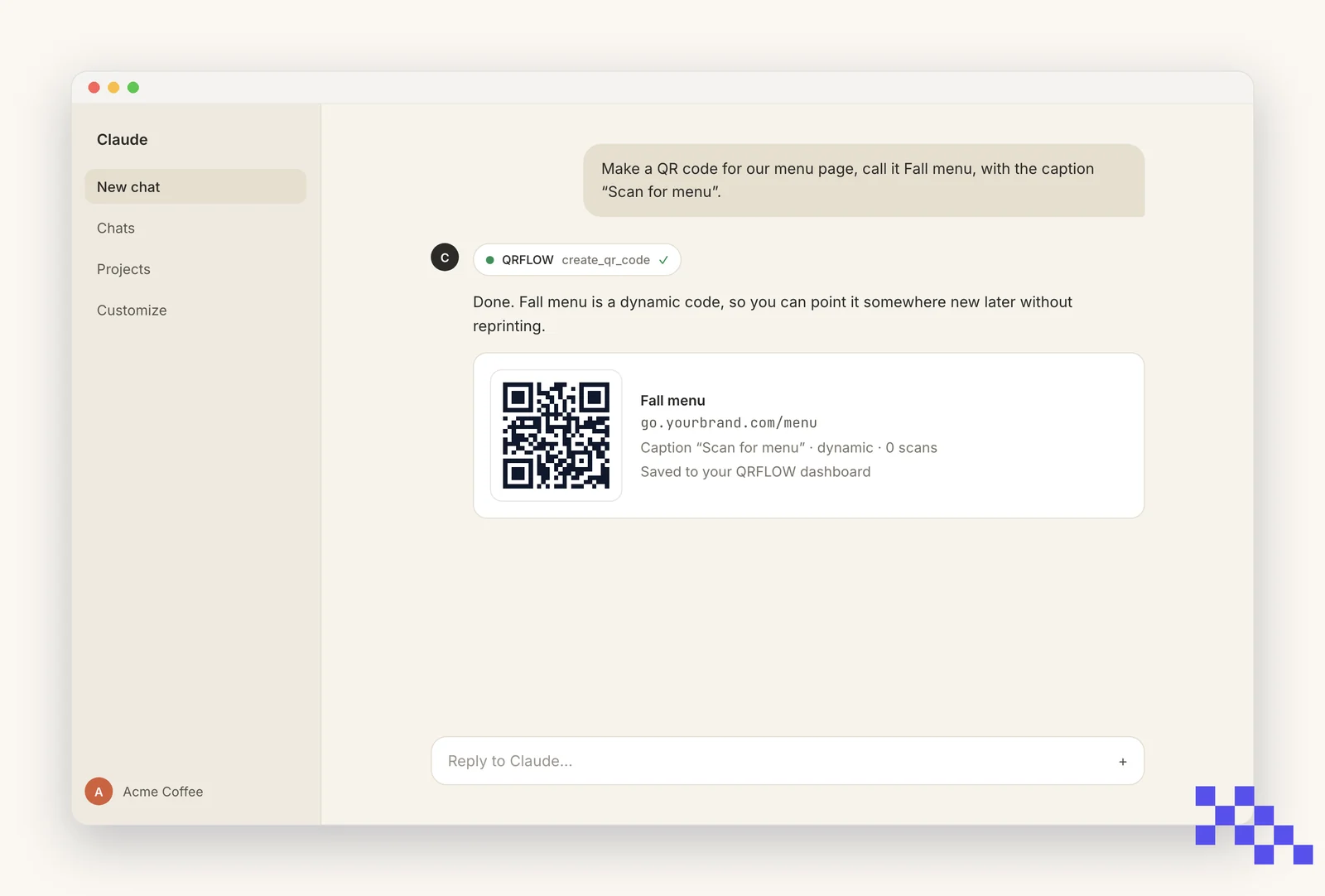
| Menu on table tents | “Make a QR code for our menu page (here is the link), call it Fall menu, caption "Scan for menu".” | Premium, so the winter menu is one sentence later |
| Guest Wi-Fi card | “Make a Wi-Fi QR code for network CafeGuest, password latte-2026.” | Free |
| Google reviews at the register | “Make a Google review QR code for our place ID ChIJ… and call it Receipt footer.” | Free for the code; Premium to count scans |
| Business cards | “Make a contact card QR code with our shop name, front-desk phone and email.” | Free |
| Event check-in or schedule | “Make a QR code for our event page (here is the link), name its link "event" on my domain.” | Premium (link name on your domain) |
| Packaging or product pages | “Make 30 codes, one per SKU in this list, each going to that product's page.” | Premium (bulk), Business for 10,000 a month |
| A campaign that will end | “Give the Spring sale code an end date of May 31.” | Premium |
| How is it doing? | “How many scans did the Fall menu code get this month, by country and device?” | Premium |
Three real situations
The menu changes, the table tents don't
A cafe prints 40 table tents in September. In December the menu changes.
“Point the Fall menu code at our winter menu page (here is the link).”
What happens: The printed code is untouched. The next scan opens the winter menu. Nobody reprints anything, and the scan count keeps running.
A poster goes up before the page is ready
An event poster has to go to print on Monday; the sign-up page lands Thursday.
“Make a QR code called Spring fair, pointing at our coming-soon page for now (here is the link).”
What happens: Monday the code prints. Thursday: "point the Spring fair code at the sign-up page" with the new link. Same poster, right page.
Which flyer worked?
Two neighborhoods got two flyers with two codes.
“Compare scans for Flyer north and Flyer south this month, by day.”
What happens: A table for each, from the same numbers as the dashboard. The next print run goes where the scans were.
Which assistant should I use?
The one you already have open. They all get the same tools; the differences are where they run and which of their plans can add a connector.
| Assistant | Where it runs | Plans that can add it | Install |
|---|---|---|---|
| Claude | claude.ai, Desktop, iPhone and Android | Free (one connector) and every paid plan | Directory: press Connect. Or paste the address. |
| ChatGPT | chatgpt.com, Desktop, iPhone and Android | Plus, Pro, Team, Enterprise, Edu (Developer mode) | Paste the address under Plugins. Directory listing submitted. |
| Claude Code | Terminal, VS Code, JetBrains | Any | One command, then /mcp to sign in. |
| Cursor | The Cursor editor | Any plan with MCP | One entry in mcp.json, then sign in. |
| VS Code with Copilot | Visual Studio Code | Any, with Copilot agent mode | MCP: Add Server, or .vscode/mcp.json, then sign in. |
| Windsurf | The Windsurf editor | Any plan with Cascade MCP | One entry in mcp_config.json (serverUrl), then sign in. |
| Codex CLI | Terminal and the Codex extensions | Any | codex mcp add, then codex mcp login. |
| Gemini CLI | Terminal | Any | gemini mcp add, then /mcp auth. |
| Gemini app | gemini.google.com, mobile apps | Not yet | No connector option yet; use Gemini CLI or the generator. |
| Microsoft Copilot | Copilot app, Windows, Microsoft 365 | Not yet (Copilot Studio via an admin) | No connector option in the consumer app yet. |
| Perplexity | perplexity.ai, apps, Comet | Not yet | No remote connector option yet. |
| Grok | grok.com, X | Not yet | No connector option yet. |
Four of those say "not yet", because the assistant has no way to add a connector of its own. There is a way round it: our Zapier app is reachable through Zapier's own MCP server, so an assistant that can talk to Zapier can make and re-point codes even when it cannot connect to us directly.
Say it your way; these are starting points
Prompts to copy
Make
“Make a QR code for our menu page (here is the link) called Fall menu, caption "Scan for menu".”
“Make a Wi-Fi QR code for network CafeGuest, password latte-2026.”
“Make a Google review QR code for our place ID ChIJ….”
“Make an Instagram QR code for our account, @yourcafe.”
“Make 20 codes, one per table, to our order page with ?table=1 through 20 on the end.”
Change
“Point the Fall menu code at our winter menu page (here is the link).”
“Name the Business card code's link "hi" on my domain.”
“Pause every code with "Summer" in the name.”
“Give the Lobby poster code an end date of December 31.”
Read
“How many scans did the Fall menu code get this month, by country?”
“Which of my codes has the most scans? Break it down by device.”
“Show me the PNG of the Front door code.”
How it stays safe
- It is your account. The assistant only acts after you sign in on a QRFLOW page and press Allow, and only inside your own codes.
- It never sees your password, and you can disconnect it from Account › Connected apps on qrflow.codes at any time.
- Destinations are allow-listed: web, mail, phone, SMS, map and a few app links. A javascript: or data: link is refused.
- Deleting is marked destructive, so the assistant asks first. Pausing is reversible and usually what you want.
- Scans record device, country, city, referrer, browser and language, never a cookie or a stored IP address.
What each plan lets the assistant do
| What the assistant can do for you | Free | Premium | Business |
|---|---|---|---|
| Static codes (Wi-Fi, contact card, one-off links) | Yes | Yes | Yes |
| Dynamic codes: change the destination after printing | No | Yes | Yes |
| Scan analytics by day, country, device | No | Yes | Yes |
| Your own link domain (go.yourbrand.com) | No | 1 | 5, chosen per code |
| Bulk: many codes in one ask | No | 500/month | 10,000/month |
| Team | 1 | 1 | 5 people |
| Price | $0 | $4/month | $29/month |
Same numbers as the pricing page. The connector itself is free on every plan.
Symptom, fix
When something is off
The assistant says it cannot make QR codes
The connector is not on for this chat. Claude: the + button at the bottom left, then Connectors, switch QRFLOW on. ChatGPT: the tools menu in the message box, add QRFLOW. Then ask again.
"That needs Premium"
You asked for something dynamic (a code that can change, analytics, a link name) on the Free plan. The assistant is telling the truth. Upgrade on qrflow.codes/pricing, or ask for a static code instead.
The sign-in page opened with the wrong account
Sign out on qrflow.codes first, then press Connect again. The account you allow is the account the codes go to.
I made a code but do not see it on my dashboard
Check which account the assistant is connected to: Account, then Connected apps, on qrflow.codes lists it. Codes made by an assistant carry its name as a badge on the dashboard.
It wants to delete a code
It asks first because deleting kills the printed link for good. If the print is out there, say "pause it instead". Paused codes show a friendly page and can be resumed.
My own domain is not in the link
The domain has to be connected and verified on qrflow.codes first (Account, then Your own link domain). Once it is, new codes use it and existing ones switch over.
ChatGPT has no place to add a connector
Custom connectors are behind Developer mode (Settings, Security and login), which the Free ChatGPT plan does not include. Claude's free plan can add one connector.
I want to stop it
Account, then Connected apps, on qrflow.codes: Disconnect. Or remove the connector on the assistant's side. Codes it made stay yours.
Six words that come up
- MCP
- Model Context Protocol, the open standard that lets an AI assistant use another service. QRFLOW publishes an MCP server; assistants connect to it.
- Connector, plugin
- The same thing seen from the assistant's side: Claude says connector, ChatGPT says plugin or app, Cursor says MCP server.
- Dynamic code
- A QR code whose picture holds a short link that QRFLOW redirects, so its destination can change after printing and every scan is counted. Premium and Business.
- Static code
- A QR code with the content inside the picture. Cannot change, is not counted. Wi-Fi, contact card and text codes are always static; on Free, every code is.
- Short link
- What is printed in a dynamic code: qrflow.codes/q/x7k2p9a, or go.yourbrand.com/menu once a domain is connected.
- Link name
- The readable part of the short link on your domain (go.yourbrand.com/menu). Set it before printing.
Questions people ask
Can an AI assistant make a QR code?
Yes. Claude, ChatGPT, Cursor and Claude Code can all draw a static QR code on their own, and with the QRFLOW connector they can make dynamic codes you can change after printing, name on your domain and track. Connect once, then ask in plain words.
Which assistants work with QRFLOW?
Claude (claude.ai, Desktop, mobile), ChatGPT (paid plans, through Developer mode), Claude Code and Cursor today. Any tool that can add a remote MCP server works the same way; each assistant has its own page here with the exact steps.
Is it free?
The connector is free and works on the Free QRFLOW plan for static codes. Codes you can change after printing, analytics and your own link domain are Premium, $4 a month. Business ($29) adds 5 domains, a team, API keys and webhooks.
What is the difference between a static and a dynamic code?
A static code has your link inside the picture; it cannot change. A dynamic code has a short link inside the picture that QRFLOW redirects, so the destination can change after printing and every scan is counted. Assistants alone make static codes; with QRFLOW they make dynamic ones.
Do I need to be a developer?
No. Adding a connector is pasting one address into the assistant's settings and pressing Allow once. Developers who want QR codes inside their own apps have a separate page at /developers.
Can the assistant change a code that is already printed?
Yes, if it is dynamic: say where it should go now. The printed code stays the same and the next scan opens the new page.
What does the assistant see?
Your codes, scan numbers and link domains, in your own account, after you press Allow. Nothing else on qrflow.codes and nothing outside it.
Can my team use it?
Each person connects with their own QRFLOW sign-in. On Business, a workspace of up to five people shares the same codes, so codes a teammate's assistant makes appear for everyone.
Where do the codes go?
Into your QRFLOW dashboard, tagged with the assistant's name, with the same download, customize and analytics pages as any other code.
Which QR code kinds can it make?
Website, Wi-Fi, contact card, email, SMS, phone, location, and the specific kinds: Google review, Instagram, WhatsApp, PDF, menu, app store and about forty more. Ask for the kind by name.
Building it into your own app?
The same server has a REST API, SDKs and webhooks. The developer docs cover it, with recipes for Next.js, Python and Workers and prompts you can paste into a coding assistant. Support: the help article, or hello@qrflow.codes.