Gemini CLI alone vs Gemini CLI with QRFLOW
Gemini CLI can write a script that renders a static QR PNG with a library. Not editable after printing, not tracked. The Gemini app itself cannot add a connector yet; this page is about the command-line tool.
| Gemini CLI alone | Gemini CLI + QRFLOW | |
|---|---|---|
| The code you get | A static PNG with your link inside | A dynamic code in your QRFLOW account (static on Free) |
| Change where it goes after printing | No | Yes, in one sentence |
| Count scans, by day, country, device | No | Yes |
| Your own domain in the code | No | Yes, on Premium and Business |
| Wi-Fi, review, Instagram, PDF and 40 more kinds | Only if you write the format yourself | Ask for the kind by name |
| Pause, expire, rename, bulk | No | Yes |
| Where it lives afterwards | In the chat | On your dashboard, tagged with the assistant's name |
Once, about a minute
Install the connector
Add it by pasting the address
- 1
Add the server
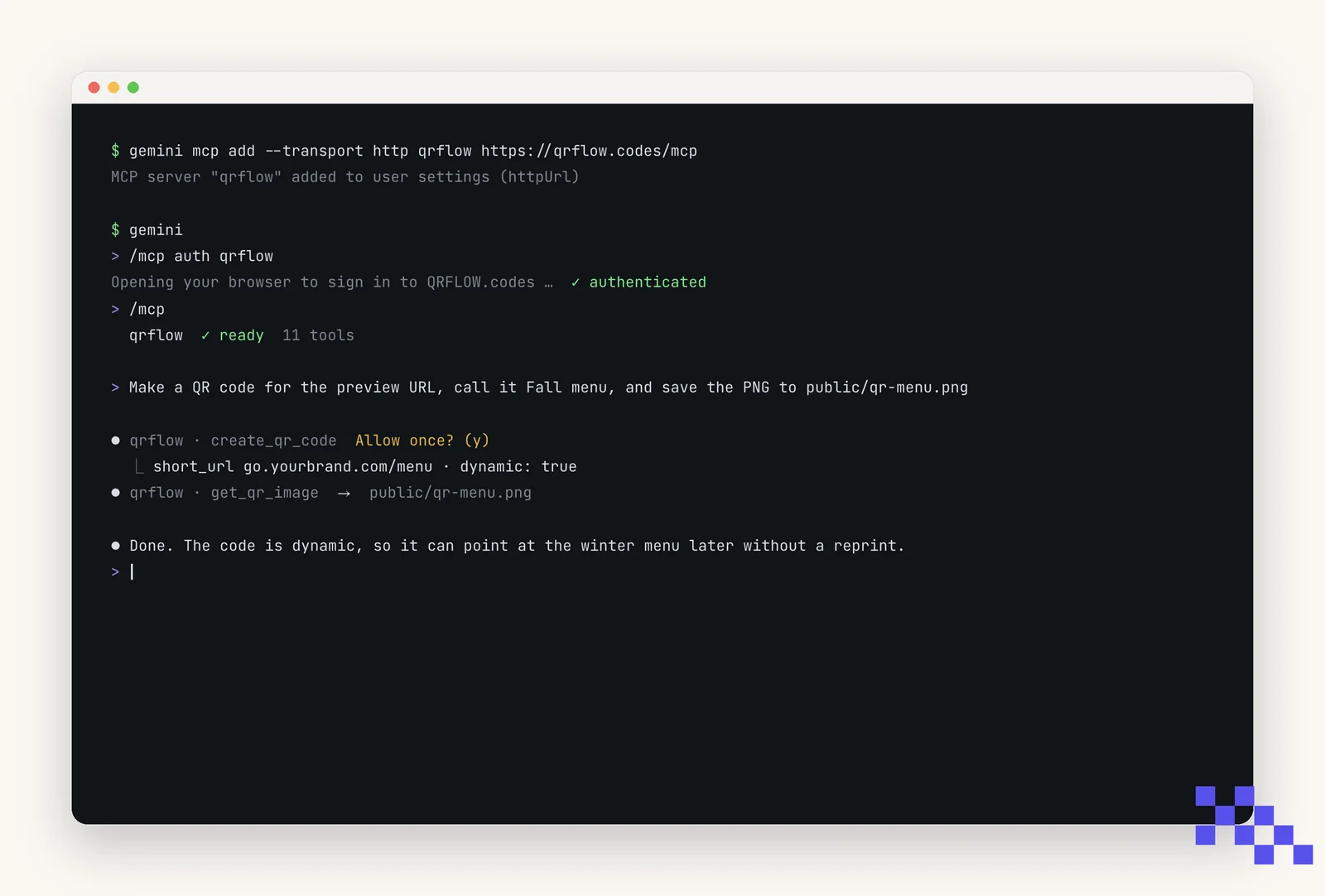
In a terminal: gemini mcp add --transport http qrflow https://qrflow.codes/mcp. Add -s user to have it in every project; it lands in settings.json as httpUrl (shape below).
- 2
Sign in
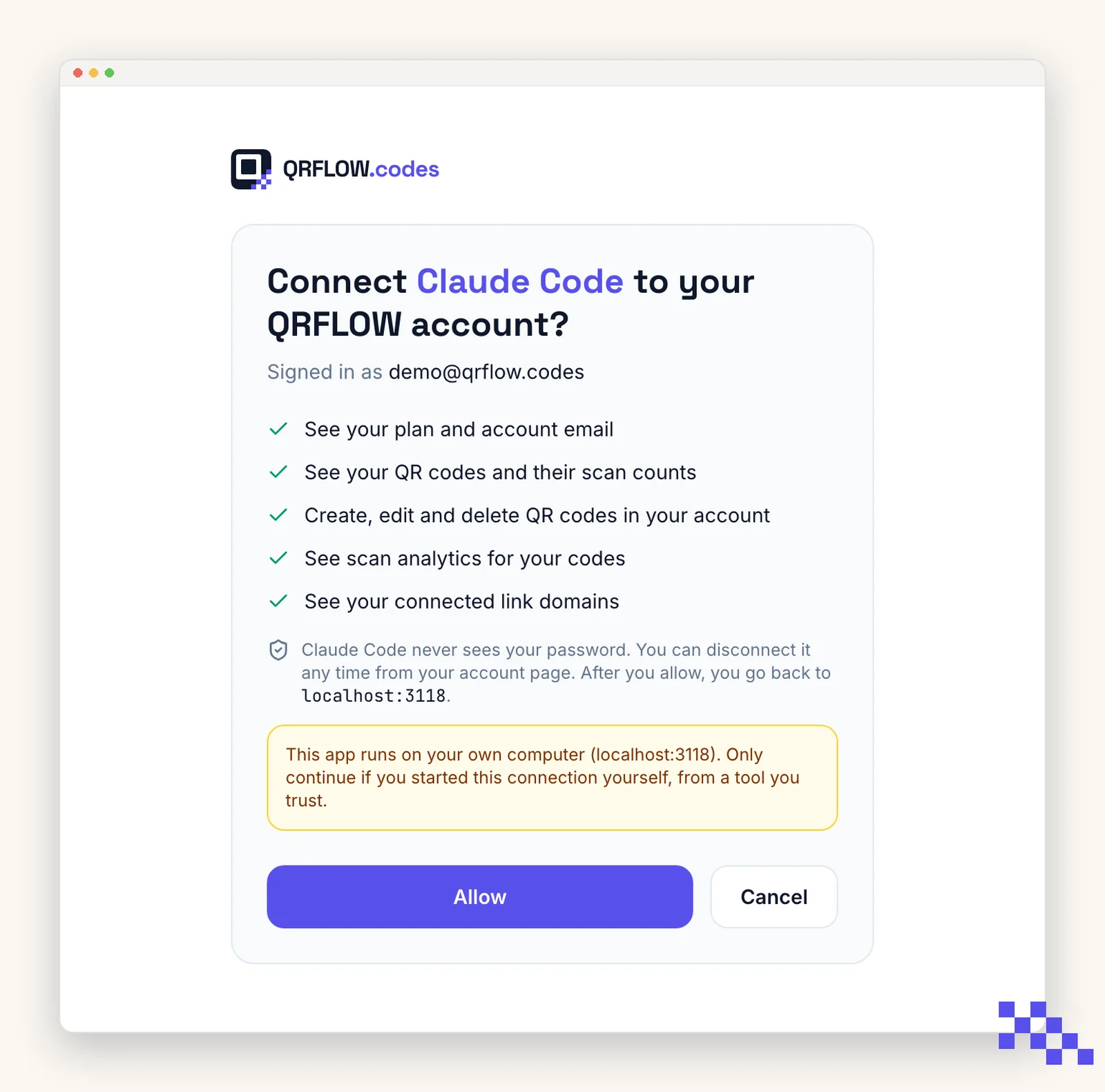
Start gemini, type /mcp auth qrflow. Your browser opens a QRFLOW page: sign in and press Allow. Gemini CLI registers itself and uses a local callback, so the consent screen says it is returning to your own computer.
Then
- 1
Ask mid-task
"Make a QR code for the preview URL and save the PNG to public/qr.png", or "list my QR codes and re-point the launch one".
The app screens above are simplified drawings, not screenshots; labels follow each app's own and can move between versions. The QRFLOW consent screen is the real one.
https://qrflow.codes/mcp
{
  "mcpServers": {
    "qrflow": { "httpUrl": "https://qrflow.codes/mcp" }
  }
}
Gemini CLI shows each tool call before it runs and asks for confirmation on anything that changes your account.
Copy and paste
Say this
“Make a QR code for the staging launch page and save the PNG to public/qr-launch.png.”
“List my QR codes and show which ones have zero scans.”
“Point the Launch code at the new landing page.”
Any kind works by name. Popular ones: Link.
What it cannot do
- Add a logo to a code. Logos are added in the QRFLOW dashboard; the assistant's image then includes it.
- Make a dynamic code on the Free plan. Free makes static codes (the content is inside the picture); Premium makes dynamic ones you can change later.
- See anything outside your QRFLOW account, or act without you: you press Allow once, and deleting a code asks first.
- Move money. A Venmo or PayPal code only opens a link you gave it.
Plans
| What the assistant can do for you | Free | Premium | Business |
|---|---|---|---|
| Static codes (Wi-Fi, contact card, one-off links) | Yes | Yes | Yes |
| Dynamic codes: change the destination after printing | No | Yes | Yes |
| Scan analytics by day, country, device | No | Yes | Yes |
| Your own link domain (go.yourbrand.com) | No | 1 | 5, chosen per code |
| Bulk: many codes in one ask | No | 500/month | 10,000/month |
| Team | 1 | 1 | 5 people |
| Price | $0 | $4/month | $29/month |
The connector is free. Dynamic codes, analytics and your domain are Premium.
Questions
Can Gemini CLI make a QR code for free?
Yes. Gemini CLI alone can draw a static QR code, and with the QRFLOW connector the Free plan makes static codes too. A code you can change after printing, name on your domain and track needs QRFLOW Premium ($4 a month).
Is the code safe to print?
Yes. QRFLOW only accepts web, mail, phone, SMS, map and a few app links; a javascript: or data: link is refused. The picture is the same standard QR any phone camera reads.
Can it change a code that is already printed?
If the code is dynamic (Premium or Business), yes: say where it should go now and the printed code follows. A static code cannot change; ask for a new one.
What does the assistant see in my account?
Your codes, their scan numbers and your link domains, and only after you press Allow on a QRFLOW page. It never sees your password. Disconnect any time from Account › Connected apps on qrflow.codes.
Does it work on my phone?
Once connected, yes: connectors follow your Gemini CLI account, so the same QRFLOW connection works in the mobile app.
How do I tell which codes an assistant made?
Every code shows its maker on the dashboard: a small "Gemini CLI" badge next to the type, the way Canva codes show "Canva".
Does the Gemini app (gemini.google.com) work too?
Not yet: the consumer Gemini app has no way to add a custom connector as of September 2026. Gemini CLI does. When the app gains connectors, this page will say so.
Next
- Make a QR code in ClaudeWorks today
claude.ai, Claude Desktop and the Claude mobile apps. In the directory: press Connect.
- Make a QR code in ChatGPTWorks today
chatgpt.com and the ChatGPT desktop and mobile apps.
- Make a QR code from Claude CodeWorks today
the terminal, VS Code and JetBrains through the Claude Code extension.
- Make a QR code from CursorBeing verified
the Cursor editor on macOS, Windows and Linux.
- Make a QR code from VS CodeBeing verified
Visual Studio Code on macOS, Windows and Linux.
- Make a QR code from WindsurfBeing verified
The Windsurf editor on macOS, Windows and Linux.
- Make a QR code from CodexBeing verified
The terminal, and the Codex IDE extensions that share its config.
- Make a QR code in GeminiNot yet
The Gemini app at gemini.google.com and the Gemini mobile apps.
- Make a QR code in Microsoft CopilotNot yet
The Copilot app, copilot.microsoft.com and Copilot in Windows and Microsoft 365.
- Make a QR code in PerplexityNot yet
perplexity.ai, the Perplexity desktop and mobile apps, and the Comet browser.
- Make a QR code in GrokNot yet
grok.com, the Grok apps and Grok inside X.
All assistants: Make QR codes with your AI assistant. Building it into your own app? Developer docs.