QRFLOW for Google Sheets™ makes a dynamic QR code for every row of a spreadsheet: the code image goes in the cell, next to its short link and a scan count. Change an address in the sheet later and the printed codes follow it. Generating codes needs the Premium plan.
Install it
- 1Open the listing on the Google Workspace Marketplace
Click Install and choose the Google account you use for Sheets.
- 2Allow the two permissions it asks for
It can only see the spreadsheet it is opened in, and it may contact QRFLOW to make your codes. Nothing else in your Drive.
- 3Open any sheet
The add-on is under Extensions, QRFLOW for Google Sheets™, Open QRFLOW.
Make a code for every row
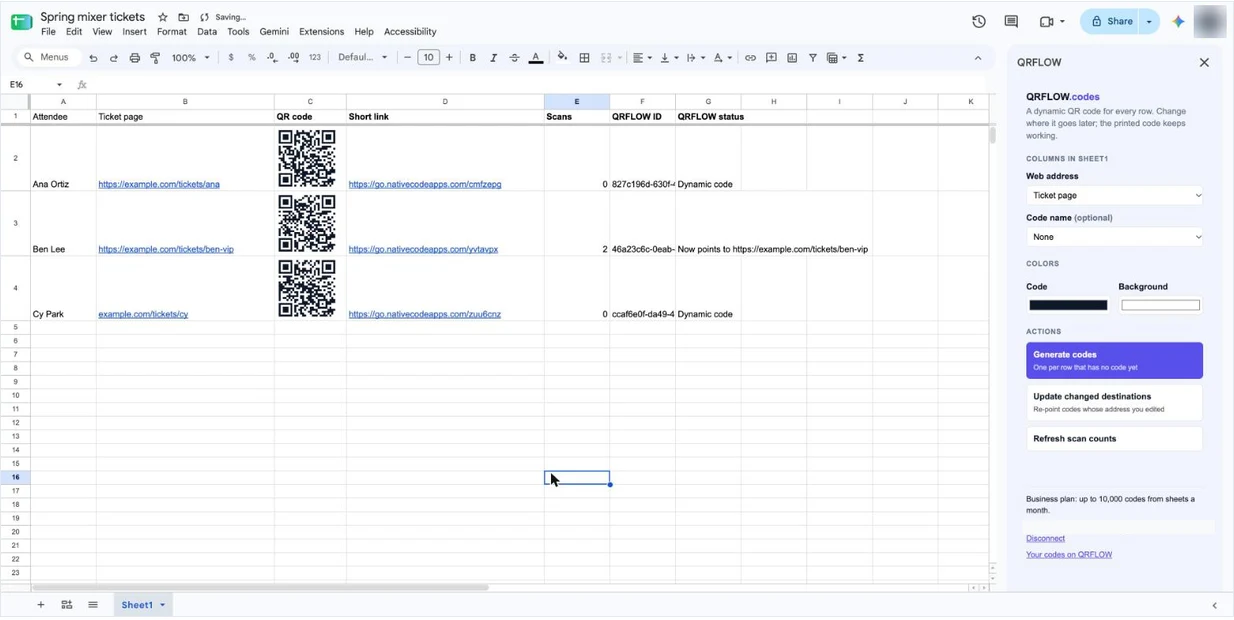
- 1Put a header in row 1 and the web addresses under it
One address per row, for example a column called Ticket page. Addresses without https:// get it added.
- 2Connect your QRFLOW account
The sidebar opens the QRFLOW sign-in once. You stay connected in every sheet.
- 3Pick the address column
The add-on guesses it from the headers. A name column is optional and becomes the code's name in your dashboard.
- 4Click Generate codes
It adds five columns at the end of the sheet: QR code, Short link, Scans, QRFLOW ID and QRFLOW status.
Rows that already have a code are skipped, so running Generate again only fills in new rows. You can move or reorder the add-on's columns; it finds them by their headers.
Tip. Very large sheets stop after about four and a half minutes, which is a Google limit on add-ons. Click Generate codes again and it carries on from the first row without a code.
Change where printed codes go
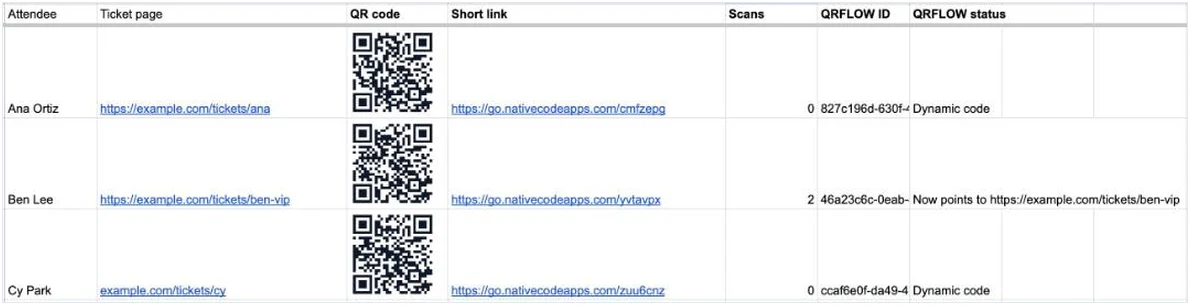
Edit the address in the row, then click Update changed destinations. Every code whose address you changed is re-pointed, and its status column says where it goes now. The QR code itself does not change, so anything already printed keeps working.
Click Refresh scan counts to pull the latest totals into the Scans column. For a breakdown by day, country or device, open the code in your dashboard.
Plans and limits
- Installing is free, and a free account can connect. Generating codes from a sheet is part of Premium ($4 a month) and Business.
- Premium makes up to 500 codes a month from sheets, Business up to 10,000. The add-on and the Bulk generator share the same monthly allowance.
- You do not need an API key or the Business plan. The add-on signs in to your account directly.
- Codes it makes are normal dynamic codes. They show a Google Sheets badge in your dashboard, where you can pause, rename or re-point them too.
If something goes wrong
- Generate codes is greyed out: the connected account is on the free plan. Upgrade, then click I have upgraded in the sidebar.
- A row says it is not a web address: the cell has spaces or line breaks in it, or no domain. Fix the cell and run Generate again.
- The sidebar asks you to connect again: you disconnected, or signed in with a different Google account. Connect once more; your codes are safe in QRFLOW.
- Codes went to the wrong place: edit the addresses and click Update changed destinations. Nothing needs reprinting.
Ready to make your own QR code?
Free QR codes rendered as you type, no signup to try. Premium makes them dynamic for $4 a month.
Still stuck? Search the help center, or contact support and a person will answer.